
How we hash our Javascript for better caching and less breakage on updates

Posted by on 01 Sep 2009 | Tagged as: technical

One of the problems we use to see frequently on Green Felt happened when we’d update a Javascript API: We’d add some parameters to some library function and then update some other files so that they called the function with the new parameters. But when we’d push the changes to the site we’d end up with few users that somehow had the old version of one of the files stuck in their cache. Now their browser is causing old code to call new code or new code to call old code and the site doesn’t work for them. We’d then have to explain how to reset their cache (and of course every browser has different instructions) and hope that if they didn’t write back that everything went OK.

This fragility annoyed us and so we came up with a solution:

  • We replaced all of our <script> tags with calls to a custom “script” function in our HTML template system (we use Template::Toolkit; [% script("sht.js") %] is what the new calls look like).
  • The “script” function is a native perl function that does a number of things:
    1. Reads the Javascript file into memory. While reading it understands C style “#include” directives so we can structure the code nicely (though we actually don’t take advantage of that yet)
    2. Uses JavaScript::Minifier::XS to minify the resulting code.
    3. Calculates the SHA hash of the minified code.
    4. Saves the minified code to a cache directory where it is named based on its hash value which makes the name globally unique (it also keeps it’s original name as a prefix so debugging is sane).
    5. Keeps track of the original script name, the minified script’s globally unique name, and the dependencies used to build the image. This is stored in a hash table and also saved to the disk for future runs.
    6. It returns a script tag that refers to the globally unique Javascript file back to the template which ends up going out in the html file. For example, <script src="js/sht-bfe39ec2e457bd091cb6b680873c4a90.js" type="text/javascript"></script>
  • There’s actually a step 0 in there too. If the original Javascript file name is found in the hash table then it quickly stats its saved dependencies to see if they are newer than the saved minified file. If the minified file is up to date then steps 1 through 5 are skipped.

The advantages of this approach

It solves the original problem.

When the user refreshes the page they will either get the page from their browser cache or they will get it from our site. No matter where it came from the Javascript files it references are now uniquely named so that it is impossible for the files to be out of date from each other.

That is, if you get the old html file you will reference all the old named Javascript files and everything will be mutually consistent (even though it is out of date). If you get the new html file it guarantees you will have to fetch the latest Javascript files because the new html only references the new hashed names that aren’t going to be in your browser cache.

It’s fast.

Everything is cached so it only does the minification and hash calculations once per file. We’re obviously running FastCGI so the in memory cache goes across http requests. More importantly the js/ dir is statically served by the web server so it’s exactly as fast as it was before we did this (since we served the .js files without any preprocessing). All this technique adds is a couple filesystem stats per page load, which isn’t much.

It’s automatic.

There’s no script to remember to run when we update the site. We just push our changes up to the site using our version control and the script lazily takes care of rebuilding any files that may have gone out of date.

So you might be thinking, isn’t all that dependency stuff hard and error prone? Well, it’s really only one line of perl code:

sub max_timestamp(@) { max map { (stat $_)[9] || 0 } @_ } # Obviously 9 is mtime

It’s stateless.

It doesn’t rely on incrementing numbers (“js/v10/script.js” or even “js/script-v10.js”). We considered this approach but decided it was actually harder to implement and had no advantages over the way we chose to do it. This may have been colored by our chosen version control system (darcs) where monotonically increasing version numbers have no meaning.

It allows aggressive caching.

Since the files are named by their contents’ hash, you can set the cache time up to be practically infinite.

It’s very simple to understand.

It took less than a page of perl code to implement the whole thing and it worked the first time with no bugs. I believe it’s taken me longer to write this blog post than it took to write the code (granted I’d been thinking about it for a long time before I started coding).

No files are deleted.

The old js files are not automatically deleted (why bother, they are tiny) so people with extremely old html files will not have inconsistent pages when they reload. However:

The js/ dir is volatile.

It’s written so we can rm js/* at any point and it will just recreate what it needs to on the next request. This means there’s nothing to do when you unpack the source into a new directory while developing.

You get a bit of history.

Do a quick ls -lrt of the directory and you can see which scripts have been updated recently and in what order they got built.

What it doesn’t solve

While it does solve the problem of Javascript to Javascript API interaction, it does not help with Javascript to server API interaction–it doesn’t even attempt to solve that issue. The only way I know to solve that is to carefully craft the new APIs in parallel with the old ones so that there is a period of time where both old and new can work while the browser caches slowly catch up with your new world.

And… It seems to work

I’ve seen similar schemes discussed but I’ve not seen exactly what we ended up with. It’s been working well for us–I don’t think I’ve seen a single bug from a user in a couple months that is caused by inconsistent caching of Javascript files by the browser.

Plumbing changes

Posted by on 01 Sep 2009 | Tagged as: news

Last night we pushed a bunch (literally hundreds) of changes up to the main site. What do they mean for you, the user? Well, you shouldn’t notice anything visually different, but hopefully things will run a little smoother than they used to. The changes were designed to address the hiccups and slowdowns seen from time to time. Whether they actually will remains to be seen.

We’ve already found at least one large bug that slipped past our rigorous (ahem) testing, so be on the lookout for anything weird and make sure you send us a bug report if you do find something wrong.

These changes should ease development for Jim’s and I as well. We’ve been unable to add certain features to the site because of design decisions we made 4 years ago. Even simple things like changing your user name were pretty much impossible because of the way we did things originally. We look forward to being able to add some neat features in the future.

Single-click is the new double-click

Posted by on 18 Jun 2009 | Tagged as: news

We just rolled out a change that will probably affect all of our players. Whereas you used to double-click a card to make the default move for that card, you now only need to single-click it in order to do so. This should make playing faster and easier. Let us know what you think about the change.

Even Better Super Moves

Posted by on 14 Aug 2008 | Tagged as: news

Recently we added automatic double click on all cards above any card you try to move. Now we’ve added automatic double click to all cards above those you might drag to. Give it a try on Sea Haven Towers or Spider. Also, from the small change department, undo animates now.

Better Super Moves

Posted by on 14 Jul 2008 | Tagged as: news

Earlier today we added a usability feature to the solitaire games that have stacks of cards. We now allow moving cards that are not at the top of a pile by first automatically (if possible) moving any blocking cards out of the way. By moving the blocking cards using their default (double-click) move we avoid giving too much help while still allowing more efficient play.

This means for example that in Free Cell and Sea Haven Towers you can now often drag the bottom card in one of the tableaus as the very first move! Give it a try and let us know what you think.

Currently in Klondike you can even move cards that are still turned over if the cards above can easily be moved. This seems a bit like cheating in this case since if you let go without moving, you can get sneak peak at the card without incurring the normal undo penalty. We may disallow this in the future.

Flower Garden super-moves

Posted by on 11 Feb 2008 | Tagged as: news

Flower Garden has been updated with support for super moves. So if you have any empty piles then you can drag 2 cards at a time instead of just one. If you have 2 empty stacks you can drag 4 cards. Note that the super moves still follow the rules as if you were moving one card at a time so you can’t drag 2 cards onto an empty pile if it’s your only empty pile.

As a Flower Garden fan, I think this improves the gameplay a lot when you are towards the end of a game.

Sudoku!

Posted by on 27 Jan 2008 | Tagged as: news

Today I fixed the last showstopper bugs in Sudoku and put it up on the main site. So now you have a new game to play.

It doesn’t seem that new to us because Jim wrote the first rough draft of it in September of 2005. Wow, we move kind of slow sometimes! It’s been 99% done for almost a year and a half but we had a bug where it wouldn’t let you type numbers into your username or password so many of you wouldn’t have been able to log in when the page was up. I finally got that fixed today (in a way that made me happy) and so you will now see Sudoku on the leader board and in the menus.

Have fun!

Under the hood changes

Posted by on 27 Jan 2008 | Tagged as: news

About a year ago we got frustrated with some of the behind the scenes workings of the site. Certain things were too slow or just written using old techniques that weren’t making us happy. So we upgraded all of the back-end code and site templating functions which should be faster and easier to work with in the long run.

We’ve been testing them internally for the past 9 months and we haven’t found any bugs in the past 6 months, so today I loaded all the new stuff onto the main site.

It looks like everything is working to me, but if you have any strange problem first try holding down shift while reloading/refreshing the page. If that you still have the problem after that, report it to us so we can fix it.

We suck. Bear with us!

Posted by on 08 Jul 2007 | Tagged as: technical

You’ve probably noticed over the past two or three months that certain parts of the site aren’t working well. Specifically, the high scores and leader board pages are often slow and even completely unresponsive. It’s happening for two reasons. The first reason is that we don’t really know squat about database design. Actually I should say “I know nothing about database design” instead of “we” and leave Jim out of this. There are a number of, uh, questionable design decisions that were made when I first set up the database and we think they might be causing the problems.

Or maybe not. See, we run our site at a hosting company (originally it ran off my cable modem at home but it was too unreliable when we started to get lots of people playing). The problem is that our hosting company runs the database on a server we don’t have access to. So when things are locking up there’s no way for us to go in and figure out what exactly is going wrong. We’ve emailed them and tried to solicit help but they aren’t very responsive. They most they’ll do is just reset the server–They don’t try to help us figure out why the problems are happening in the first place.

So what is the solution? Well, we’re attacking both problems. First we are going to move to a new database that will run on a server that we have access to. Second, we are going to start making some changes to our database that will make it smaller and more streamlined. This should also help make things faster.

So hang in there! Bear with us. We’re working on it and we’ll hopefully have something soonish. Hopefully you won’t notice the transition except that the non-responsiveness will go away (forever, ideally). We’ll probably mention something here–I’m even considering a beta test, but no guarantees.

Cool statistics

Posted by on 07 Mar 2007 | Tagged as: Uncategorized

This weekend I was talking with Jim, and each of us was lamenting the lack of good statistics on this site. We wanted to know how many games are played and which games get played more and how many unique users there are per day, etc. Jim pointed out rrdtool and I decided to set it up and see what kind of data I could get. We thought the end results were pretty interesting and thought they might be of interest to the Greenfelt users.

Here is 1 days worth of Greenfelt data:

The data is stacked up so that the total height of each bar is the total number of games per hour. The bar is then divided so you can see which games make up what percentage of that bar. Each bar represents 15 minutes. The graph is updated every 15 minutes so if you check back here later it will always be up to date.
Not so surprisingly, Freecell looks like the most popular game. Somewhat surprising to me is that Forty Thieves seems to have a lot of plays. Spider, which is really hard also manages to have a respectable number of games played.

Next is the 30 day view:

This is interesting because it shows that huge difference between days and nights. Also you can see that more people play at night in the middle of the week than on weekends (what you have better things to do?? :-)). And Wednesday seems to be the peak. Right now you can also see a huge gap in the Sunday before last when hosting provider (Dreamhost) went down for a couple hours (since this is also updated every 15 minutes that will eventually go away).

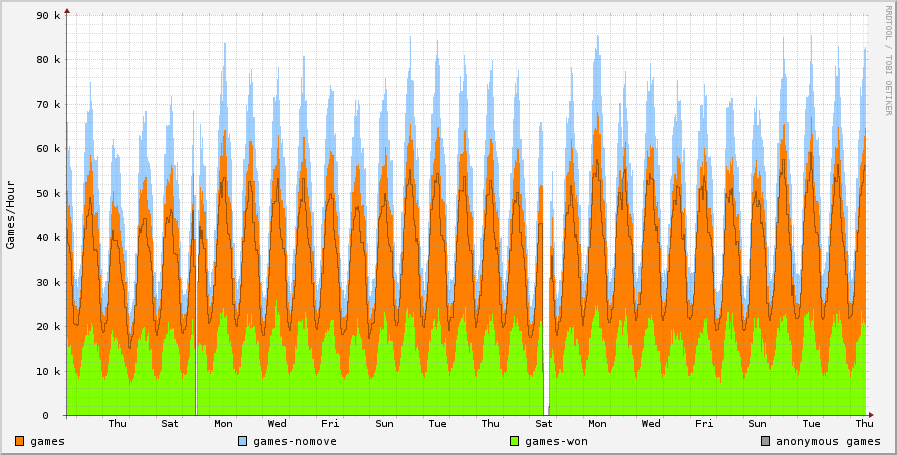
And finally, another interesting one is the year long view:

This show total number of games in orange. The green show how many of those games people actually won (getting a score of 52 in Freecell, for instance). The black line show how many of those games were played by anonymous users.

This one had 3 surprises for me. The first was that our overall growth curve is pretty good. Some spikes here and there but it seems to be increasing nicely. The second was that a really good portion of games are winnable. I expected the green bars to be much lower. The third surprise is that apparently 90% or so of people playing Green Felt play without logging in. I expected a large amount of anonymous users, but such a high percentage really surprises me.

Anonymous users, I’m curious–why do you prefer to be anonymous? Does the high score table not interest you? What kind of incentive would it take to make you decided to create an account?

« Prev - Next »